
Geta.Team Masterclass: Build AI Employees That Work Alone


Most AI tools wait. You open a tab, you type, you copy the answer somewhere useful. Nothing happens between your prompts, and the tool forgets you the moment you close it.
Geta.Team takes a different position. You hire an employee, give it a mailbox and a phone number, tell it what the job is, then go do something else. I spent a week rebuilding a support and sales workflow on it, self-hosted, and this is the walkthrough I wish I'd had.
What Actually Makes It an "Employee"
The word gets thrown around a lot, so here's the concrete difference. A Geta.Team employee has:
- Its own email address and phone number. People outside your company contact it directly, not through your login.
- One identity across every channel. The same employee answers on Slack, Teams, WhatsApp, Telegram and Discord, carrying the same memory into each. A customer who calls, then emails, then pings Slack is talking to one colleague, not three disconnected bots.
- Its own filesystem and execution environment. Each employee gets an isolated workspace where it stores files, installs what it needs and runs code. Your DevOps engineer's sandbox is not your legal assistant's, so one going sideways doesn't touch the other.
- Persistent, editable memory. It remembers the last conversation, and you can open its memory and correct it.
- A Heartbeat. It wakes on a schedule (every 2, 4, 8, 12 or 24 hours), checks what you told it to care about, and stays quiet if nothing matters. As the docs put it: the schedule is not the feature, the judgement is.
- Skills you grant explicitly. Browse the web, run code, generate images, publish a page, query a database. Nothing is on by default.
Twelve pre-built roles ship in the catalog, covering revenue (Marketing Manager, Sales Director, SEO Specialist, Real Estate VA), back office (Customer Support, Admin Assistant, Financial Analyst, HR Coordinator, Legal Assistant) and build (DevOps Engineer, Product Designer, Video Producer).
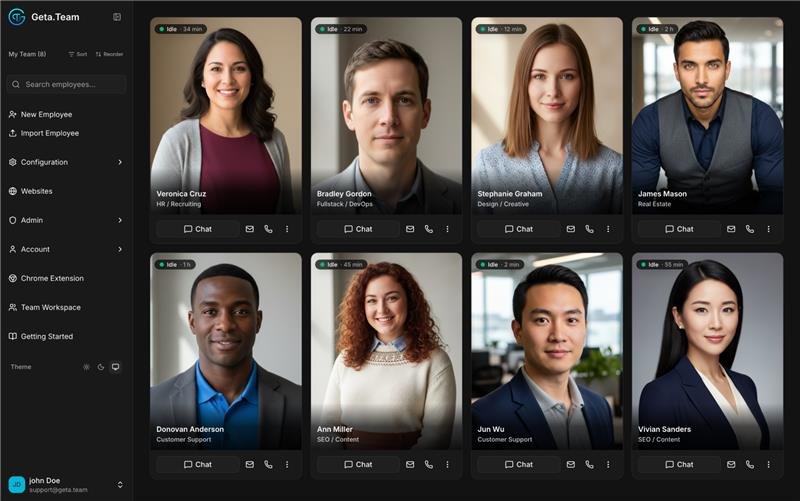
The dashboard is the whole roster at a glance: who's idle and for how long, which channels each one is wired into, and a direct chat, email or call button on every card.
Step 1: Hire
The wizard is three screens: identity, profile (position and communication style), then a photo you upload or generate.
One thing that bit me: Main Language is not cosmetic. It sets the default across every channel, including outbound email and voice calls. Get it right at hire time or you'll be fixing tone in three places later.
Team Isolated is on by default, so your new hire can't see the rest of the roster. Leave it on until you know what it does unsupervised.
Step 2: Give It Channels
Channels are how the outside world reaches your employee, and this is where the platform separates itself from a chat window.
| Channel | What it unlocks |
|---|---|
| Any number of Gmail and Outlook accounts on one teammate. Replies leave from the right mailbox, and sensitive messages wait in Drafts for your approval. | |
| Voice | Inbound and outbound calls in 21 languages. It books meetings and updates the CRM during the call, not after. |
| Slack, Teams, WhatsApp, Telegram, Discord | Mention it in a thread and it answers in place, with the surrounding conversation as context. |
| Webhooks | Trigger the employee from a form, a new order, a deploy notification. Signatures are verified. |
Start with one channel. An employee wired into six on day one is an employee you cannot debug.
Step 3: Give It Skills and Tools
Skills are capabilities you add from the marketplace. Tools are built-ins you toggle. The docs are blunt about the right posture: grant only what the job needs, because a skill an employee never uses is one more way for it to go sideways.
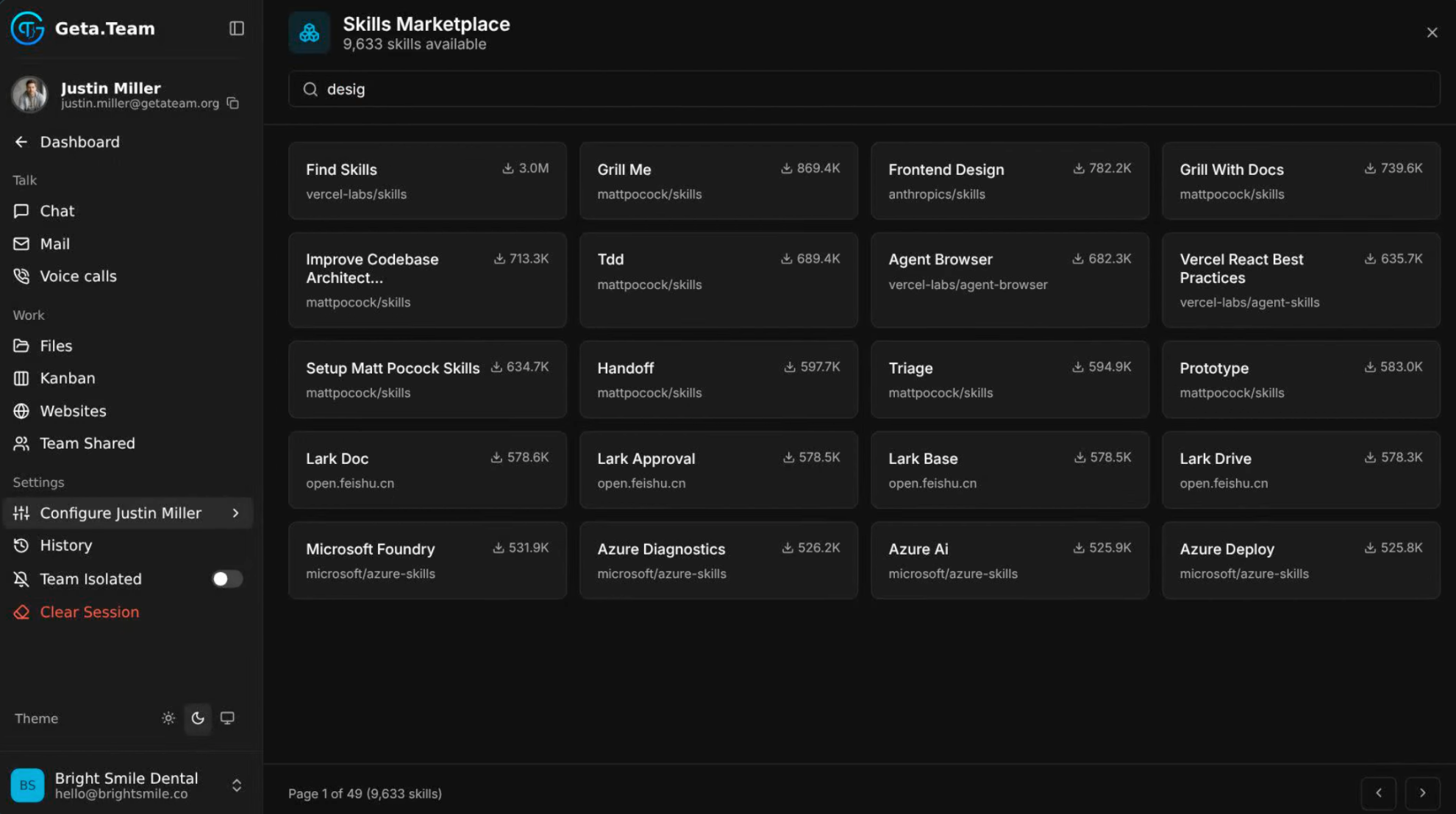
The marketplace is bigger than I expected: 9,633 skills at the time of writing, published by the likes of Vercel, Anthropic and Microsoft, with download counts so you can see what people actually use. Search, install, done.
The MCP connector is where this gets interesting. Twenty-seven production-ready MCP servers ship ready to install (HubSpot, Salesforce, Stripe, GitHub, Jira, Notion, Shopify and more), and you can add any custom server over NPM or HTTP.
You're not locked into a model either. Geta.Team accepts any OpenAI-compatible endpoint: Claude, Gemini, OpenRouter, and self-hosted runtimes like Ollama, vLLM and LM Studio. You set the model per employee, so a triage bot runs on something cheap while your contract reviewer runs on something expensive.
Step 4: Make It Autonomous
This is the step most people skip, and the one that turns a chatbot into a colleague.
Task automation handles recurring jobs on a cron in your timezone. Heartbeat does the judgement work: it checks, decides whether the result deserves your attention, and only then pings you. Webhooks let external systems start the work. And Nova, the voice layer, sits above the whole roster: you ask out loud who's working, and she routes new requests to whoever fits.
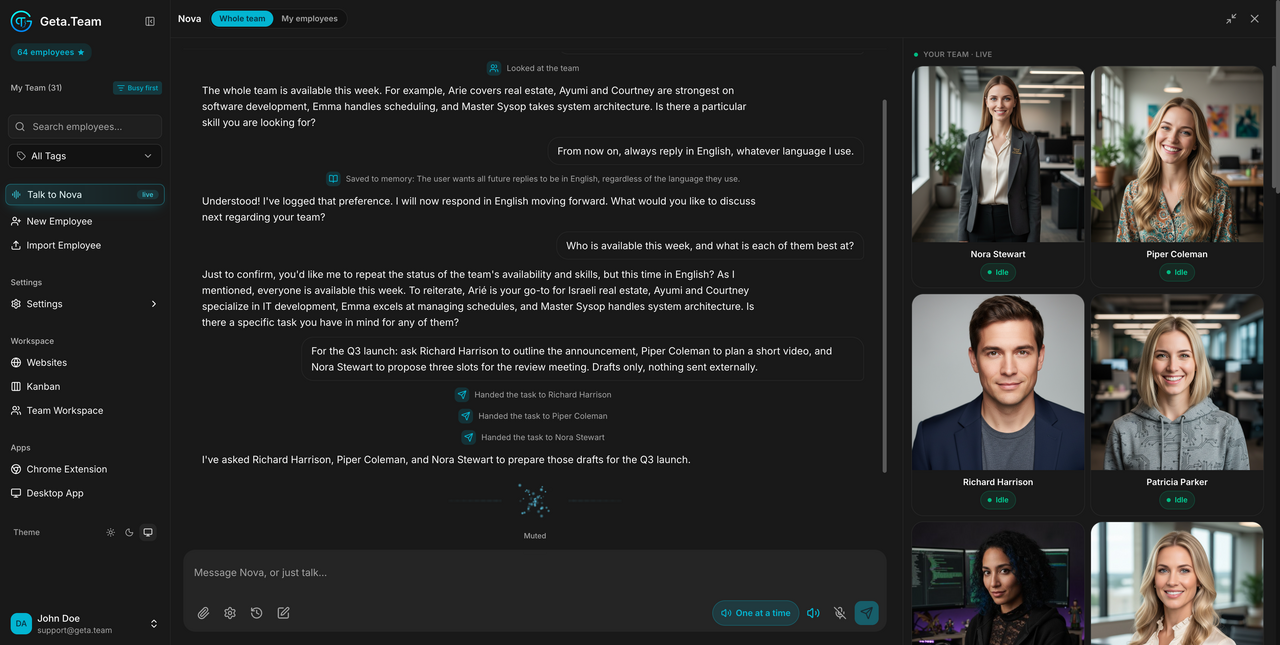
That screenshot is the part worth studying. One instruction ("ask Richard to outline the announcement, Piper to plan a short video, Nora to propose three slots, drafts only, nothing sent externally") fans out into three handoffs. Note the memory line too: a stated preference gets written to memory as it happens, not at the end of the session.
Configuring Heartbeat is a conversation, not a form. The employee interviews you about what to escalate and what to ignore.
What People Actually Build With It
Geta.Team publishes a library of 36 documented scenarios. The figures below are theirs, not ours, so treat them as vendor-reported. What's useful is the shape of each build:
| Scenario | The setup | Result (vendor-reported) |
|---|---|---|
| SaaS support, 80 tickets/day, 2 humans | Email and chat, help-doc access, escalation with context | 78% auto-resolved, reply time 18h to 4min |
| Solo real estate agent, 40 leads/month | Email, SMS, WhatsApp, calendar access, MLS monitoring | Lead conversion up 52% |
| B2B inbound, 8 SDRs, 6h response time | Webhook on form submit, BANT qualification, calendar booking | Qualified pipeline up 40% |
| AP team of 3, 1,500 invoices/month | Inbox monitoring, PO matching, approval routing | Processing time down 75% |
| Freelance dev, 15h/week on admin | One mailbox, calendar, invoice follow-up automation | Admin down to 5h/week |
The pattern in every one: a channel that already receives requests, a decision rule the employee can apply, and a system of record it can write to. Miss any of the three and you get a demo instead of a workflow.
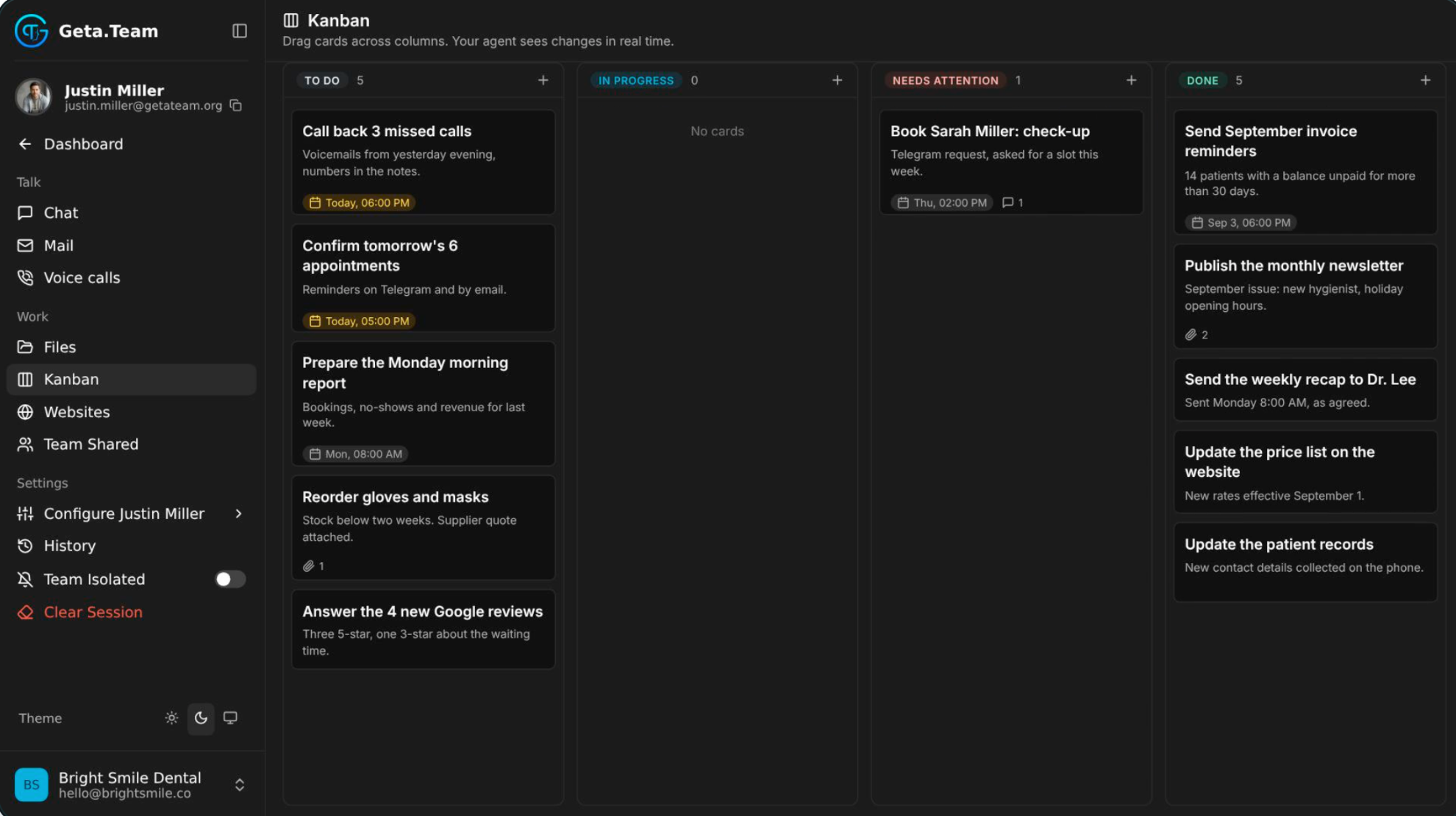
Here's what that looks like day to day for a dental practice: call back three missed voicemails, confirm tomorrow's appointments over Telegram and email, chase 14 unpaid balances, answer the new Google reviews. The Kanban is shared, so you drag a card and the employee sees it move in real time. Watch the "Needs Attention" column in particular. That's the escalation path, and the card sitting in it came in over Telegram.
The Control Layer
Autonomy without brakes is how you end up in an incident review. Geta.Team ships Guardrails, a separate judge model that screens requests before the employee acts.
Two design choices matter. The judge runs on a different model from the employee, so a jailbreak that fools your agent doesn't automatically fool the thing checking it. And the rules are plain text you can edit, with an always-allowed list for cases like security research. Blocked requests return a bare number (Guardrail No:204) rather than explaining the logic.
Since v2.7.18, screening covers inbound messages too, across email, Slack, Teams, Telegram, WhatsApp and webhooks. It's off by default, so turn it on deliberately. Alongside that: role-based access (User, Builder, Admin), draft approval for anything sensitive, and a per-employee audit trail.
SaaS or Self-Hosted
The choice comes down to who holds the infrastructure and who holds the LLM keys.
SaaS Cloud gives you a dedicated server per workspace in the EU (Nuremberg) or US (Manassas), credits included. You sign up at dash.geta.team and there's nothing to configure. BYOK keeps that managed infrastructure but routes prompts to your own provider account.
Self-hosted is the full sovereignty option, and Geta.Team runs as a managed deployment on Elestio, which handles SSL, backups, monitoring and updates. Pick from Netcup, Hetzner, DigitalOcean, Vultr, Linode, Scaleway, AWS or your own VM. Plan for 4 CPU / 8 GB RAM as a baseline, around $29/month on Netcup NVMe (the Geta.Team license is separate). After deployment you point it at your own LLM keys and your own domain with full SPF/DKIM/DMARC, so each employee gets a mailbox on your brand.
Self-hosted also unlocks white-labeling: your logo, your colors, your domain. Agencies resell the platform this way without clients ever seeing someone else's name.
Troubleshooting
Employee replies in the wrong language. Check Main Language on the employee profile, not the channel config. It cascades everywhere.
Emails send from the wrong address. Set the default sender explicitly. With several mailboxes on one teammate, the platform infers from the thread, and a cold outbound has no thread to inherit from.
Guardrails blocking legitimate work. Rules are editable text. Add your category to the always-allowed list rather than disabling screening wholesale.
Long tasks stopping halfway. Custom LLM employees had an 8,192-token output ceiling that reasoning alone could exhaust. v2.7.18 raised it to 32,768.
Scheduled tasks only firing once a day. That cap is a free-tier restriction. On paid and self-hosted, crons run at whatever frequency you set.
Where This Is Heading
The team also published GAP, the Geta Agent Protocol, an open-source layer (MIT / Apache 2.0) that lets agents discover each other, sign contracts, escrow payment and verify delivery. MCP solved agent-to-tools and A2A solved agent-to-agent messaging; GAP aims at the transaction layer on top of both. It's at v0.1, but the live node at gap.geta.team publishes settled jobs and judge verdicts, failures included, which tells you something about how they intend to run it.
Wrapping Up
What changed my mental model here was the unit of work. In most agent frameworks you assemble a pipeline and maintain it. Here you define a role, hand it a channel and a mandate, and the platform handles the plumbing underneath. That trade costs you some low-level control and buys you a lot of time.
Start with one employee, one channel, one workflow you can describe in a sentence. Everything else compounds from there. Take the hosted route at dash.geta.team, or deploy it on your own infrastructure with Elestio if the data needs to stay yours.
Thanks for reading ❤️ See you in the next one 👋