
Infinidisk: Turn an S3 Bucket Into a Linux Disk


Every disk I've ever provisioned was the wrong size. Too small, and you're resizing a volume at 2 a.m. while Postgres complains about free space. Too big, and you're paying every month for 400 GB of nothing. And when the machine dies, the disk usually goes with it, so you're restoring from last night's backup and hoping it was last night's.
Infinidisk is Elestio's answer to all three problems. It turns an Elestio Object Storage bucket into a regular Linux block device. You format it with ext4, XFS or btrfs, mount it, and point any program at it, databases included. There's no size to plan, you pay only for what's actually stored, and the disk lives in the bucket, not on the machine.
This is the long version: how it works under the hood, every feature worth knowing, the real benchmark numbers (including the unflattering ones), and what to do when things go wrong.
How It Actually Works
The interesting part of Infinidisk is how it hides the latency of object storage. S3 is great at storing a lot of data cheaply and terrible at small random writes. A database does almost nothing but small random writes. So Infinidisk never makes your application wait for the bucket:
- Writes land in a local write log on the machine's own disk first. Your application gets its acknowledgment at local disk speed.
- Hot data is served from local caches. Anything you read twice comes from the machine, not the network. The rest is fetched from the bucket on demand.
- The disk is shipped to the bucket as complete checkpoints, every 60 seconds by default, sooner under heavy writes.
That design gives you a very specific set of guarantees, and it's worth reading them carefully:
- If the Infinidisk process crashes, no acknowledged write is lost. The local write log is replayed on restart.
- If the whole machine dies (power cut, hard reboot, lost local disk), you can lose the writes made since the last checkpoint that reached the bucket. Usually that's under a minute, but 60 seconds is a target, not a promise: a big upload backlog or an Object Storage outage can stretch it.
- In every case, the disk is never corrupted. You get a consistent disk, and your filesystem or database recovers exactly as it would after a power cut.
Two more properties fall out of the design. A disk can only be mounted by one machine at a time (it's locked while mounted), and one bucket can hold several disks, each in its own folder (infinidisk/<name>/).
Setting Up Your First Disk
You need a Linux machine (amd64 or arm64) with root access, which every Elestio service has, and a Read and write API key for the bucket. Open the bucket, go to the Connect tab, and unfold Use this bucket as a Linux disk:
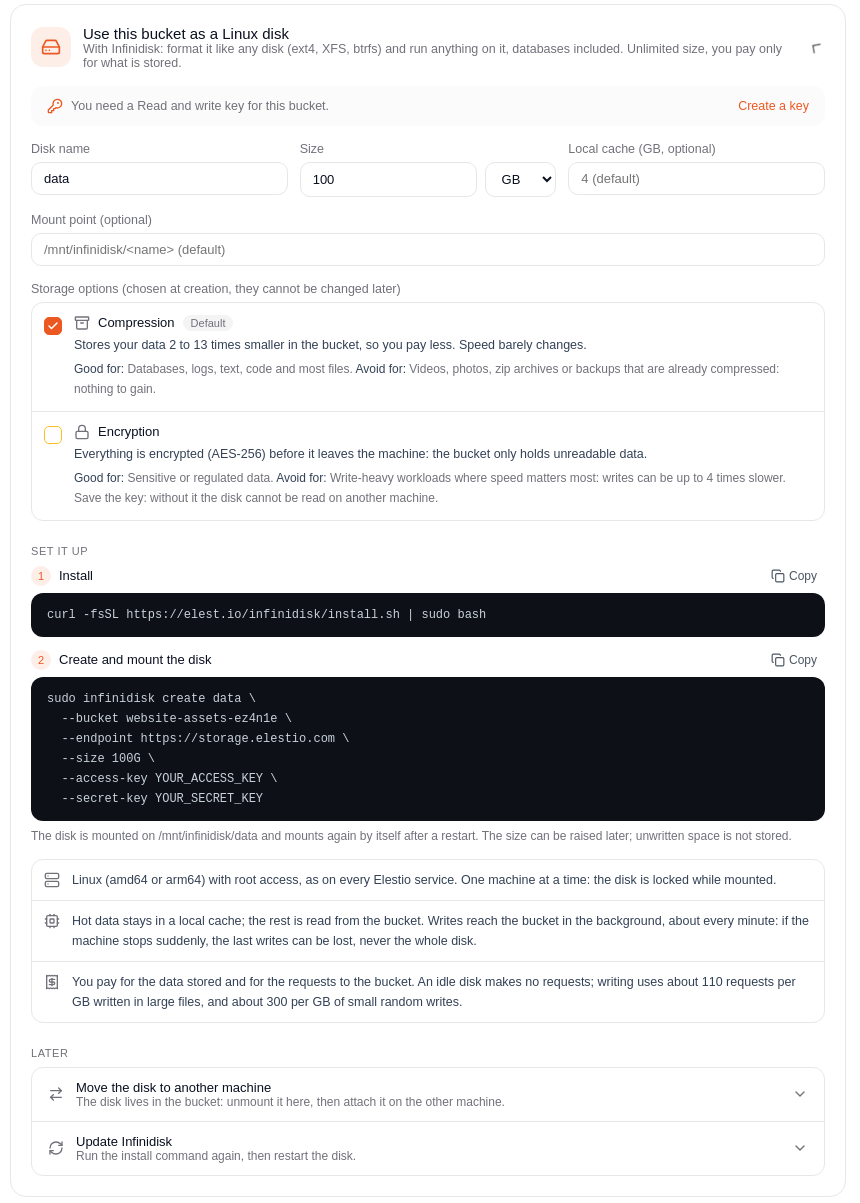
Pick a name, a size (raise it later anytime; unwritten space isn't stored, so a 1 TB disk holding 10 GB of data is billed for those 10 GB, or less once compressed), and optionally a local cache size (default 4 GB) and mount point. Then run the two commands the dashboard gives you:
curl -fsSL https://elest.io/infinidisk/install.sh | sudo bash

sudo infinidisk create data \
  --bucket my-bucket-k7x2qm \
  --endpoint https://storage.elestio.com \
  --size 100G \
  --access-key YOUR_ACCESS_KEY \
  --secret-key YOUR_SECRET_KEY
The disk is now mounted at /mnt/infinidisk/data and remounts by itself after a reboot. Add --cache-gb 8 for a bigger cache or --mountpoint /your/path for a custom location.
Pick Your Options at Creation Time
Two storage options change how the disk is stored in the bucket, plus one recovery option. All of them are set at create and fixed for the life of the disk:
| Your data | Options | Why |
|---|---|---|
| Databases, app files, logs | Default (zstd compression on) | 3 to 8.6 times less stored data, databases keep 82 to 90% of native speed |
| Videos, images, archives, backups | --no-compression | Already compressed; skip the work |
| Sensitive or regulated data | --encryption | Encrypted before it leaves the machine |
| Anything you might need to undo | --pitr-window 24h | Restore the disk to any moment in the window |
They combine. A database holding personal data might get --encryption --pitr-window 24h.
Encryption, Done Properly
--encryption encrypts every 4 KiB page with AES-256-XTS before it leaves the machine. It uses envelope encryption: a data key encrypts the pages, and a key-encryption key (KEK) protects the data key. Compression still works, because data is compressed first and encrypted second. The bucket only ever holds unreadable data.
Print the KEK the moment you create the disk, and put it in your password manager or vault:
sudo infinidisk create secrets --size 50GiB --bucket ... --encryption
sudo infinidisk key secrets
Lose the key, lose the disk. That includes every backup of it.
Because of the envelope design, rotating the key is instant, rewrites no data, and works while the disk is mounted. Run sudo infinidisk key secrets --rotate when someone with access leaves. Keep old keys as long as you keep backups made with them.
My favorite detail: --local stores an encrypted disk in a directory on the machine itself, no bucket involved. Any Elestio service gets encryption at rest in one command:
sudo infinidisk create vault --local /var/lib/infinidisk/vault-store --size 50GiB --encryption
Snapshots and Point-in-Time Recovery
Snapshots are named, read-only copies stored in the bucket, and only the changes since take space:
sudo infinidisk snapshot data create nightly
sudo infinidisk snapshot data list
sudo infinidisk clone data data-copy --from-snapshot nightly   # independent copy, original untouched
sudo infinidisk rollback data nightly                          # replaces current content
Use clone to fish out a few files; use rollback only when you really want to go back.
Snapshots live in the same bucket, so they won't save you if the bucket itself is lost. For a real off-site backup, take a snapshot, then copy the disk's folder to another bucket (note the path-style endpoint):
aws s3 sync s3://my-bucket-k7x2qm/infinidisk/data s3://my-backup-bucket-p3r8tz/infinidisk/data \
  --endpoint-url https://storage.elestio.com
If the disk is encrypted, save its key separately, labeled with the date: sudo infinidisk key data > /secure/data-$(date +%F).kek.
Point-in-time recovery goes further. With --pitr-window 24h, every checkpoint becomes a recovery point, so you can rewind to any minute of the last day:
sudo infinidisk pitr data restore recovered --ago 10m
The restore always creates a new disk, so a bad guess costs you nothing. One honest caveat: this is crash-consistent at disk level. For recovery to an exact transaction, keep your database's own log archiving (PostgreSQL WAL, MySQL binlog) too.
Moving, Growing, Updating
Move a disk to another machine: stop the apps, sudo infinidisk umount data (this drains pending writes to the bucket), then run infinidisk adopt with --takeover on the new machine. For disaster recovery, make sure the old machine is really dead first: --takeover doesn't stop it, and two machines writing to one disk will damage it.
Grow it: stop the apps, run sudo infinidisk resize data --size 200G, start them again. The disk is remounted and its filesystem grown.
Update it: rerun the install script, then sudo systemctl restart infinidisk-vol@data after stopping the apps. Note that v1.0.7 is one-way: once a disk runs on it, v1.0.6 can't open it anymore.
The Benchmarks, Honestly
Here's how each storage mode compares with the native disk of the same 4 vCPU machine (v1.0.6, disk stored locally):
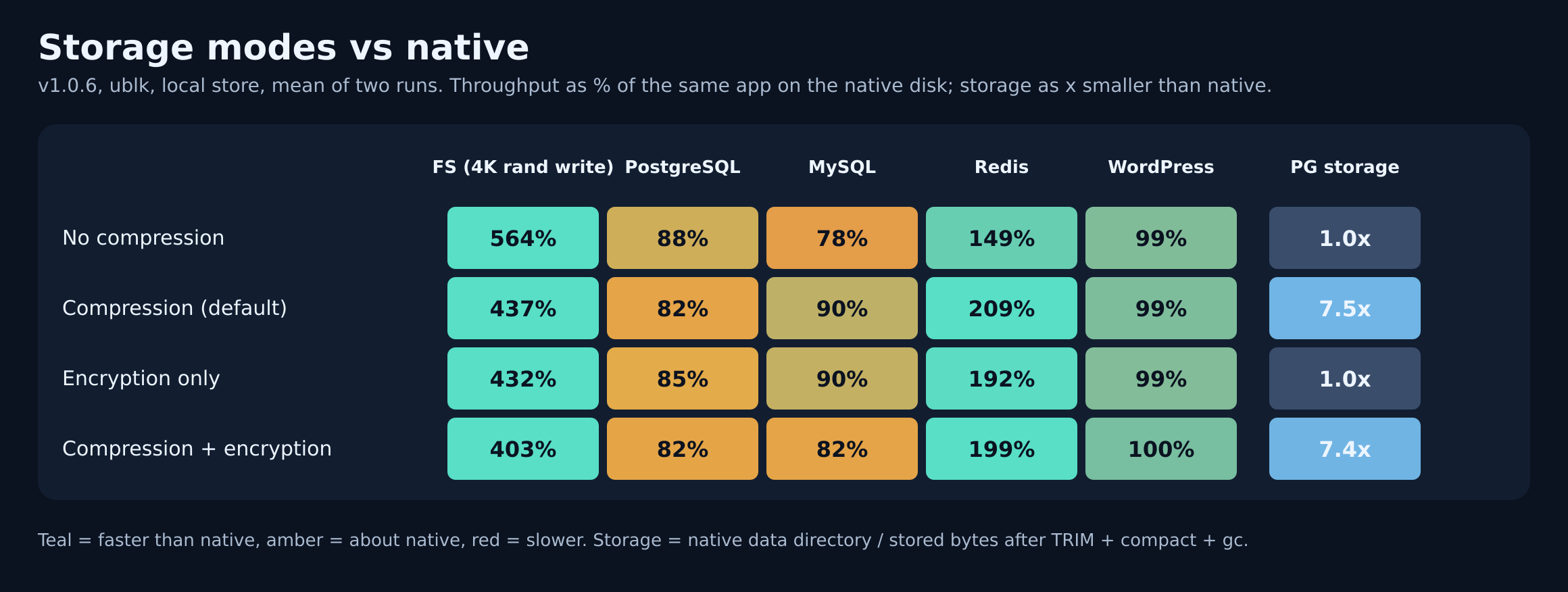
Small random writes run at 437% of native with default compression (my reading: they land in the local write log first), Redis with appendfsync always at 209%, WordPress at 99%, MySQL at 90% and PostgreSQL at 82%. Encryption is nearly free for applications.
Reads are where you need to read the fine print:
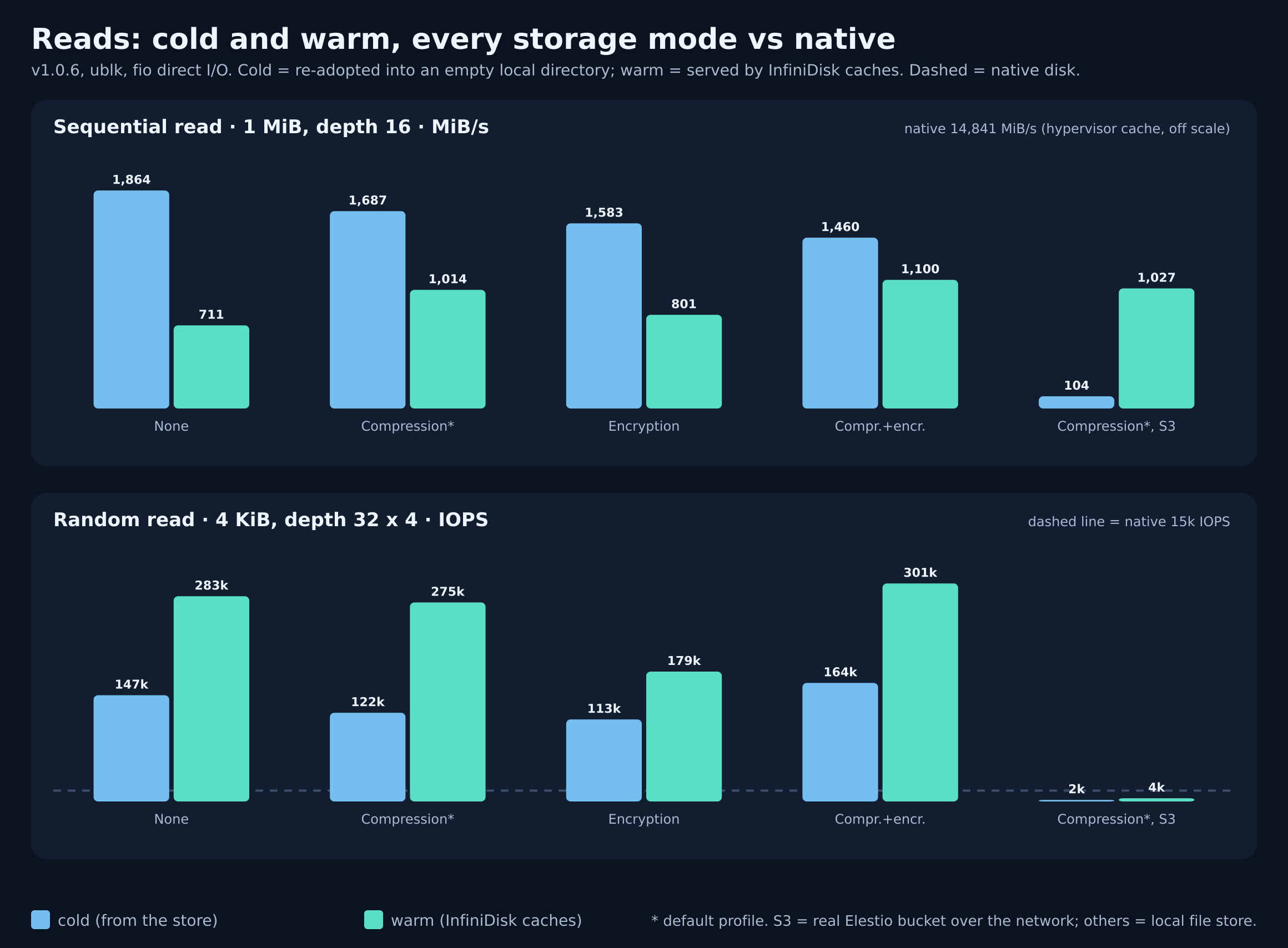
The first four groups store the disk on the same machine, so even "cold" reads are fast. The last group is the real world: a disk on an actual Elestio bucket over the network. Cold sequential reads run at 104 MiB/s (close to the machine's ~110 MiB/s link) and jump to 1,027 MiB/s once cached. Cold random reads over the network are slow, around 2,000 IOPS. That's why the cache size matters more than anything else.
On a real bucket with default options, the docs report PostgreSQL at 10,400 TPS (0.77 ms latency), MySQL at 1,380 TPS with no stalls, and zero requests while idle. Version 1.0.7 also cut bucket requests for a 10-million-row PostgreSQL load from 5,400 GETs to 43.
What It Costs
You pay for stored data and bucket requests. Writes use about 110 requests per GiB written sequentially and about 300 per GiB of small random writes. On a single-region bucket ($0.005 per 1,000 writes), that's about $0.0006 per GiB written sequentially and $0.0015 per GiB of random writes: 100 GiB of sequential writes costs around 6 cents in requests.
Compression does most of the work on the storage side. Measured on real data: 2.81 GB of nginx logs stored as 529 MB, and a 3.89 GB PostgreSQL data directory stored as 1.27 GB. Plan on roughly 3x savings for databases and 5x for logs.
Troubleshooting and Good Practices
Scans are slow and the request count climbs. Your cache is smaller than your working set. For a database, give it at least the database size plus margin (--cache-gb 8 for a 4 GB database).
Worried about how much is unsynced? sudo infinidisk status data shows "pending to S3": what isn't in the bucket yet.
The bucket briefly holds twice your data after a big load. Normal. Index builds and vacuums rewrite pages, and since v1.0.7 old copies are cleaned up within 5 to 15 minutes.
Space isn't freed after deleting files (v1.0.6). Run sudo fstrim /mnt/infinidisk/data. On v1.0.7 the disk is mounted with discard, so it's automatic.
Containers still see the old version after an update. They keep the old mount. Stop them before restarting the disk.
Encrypted disk won't attach on a new machine. Pass the key that matches the backup: sudo INFINIDISK_KEK="$(cat /secure/data.kek)" infinidisk adopt ....
Is It for You?
If you run databases or apps that keep growing, want off-machine durability without managing replication, or need encryption at rest in one flag, yes. If you need every single write to survive a sudden power cut on a write-heavy database, keep your database's own WAL or binlog archiving alongside it. The docs say so plainly, and it's the right trade-off for most workloads.
The full reference lives in the Infinidisk documentation. Create a bucket in your Elestio dashboard, open the Connect tab, and try it on a test service first.
Thanks for reading ❤️ See you in the next one 👋