
Nao: Free Open Source AI Data Analyst (Chat With Your Data)

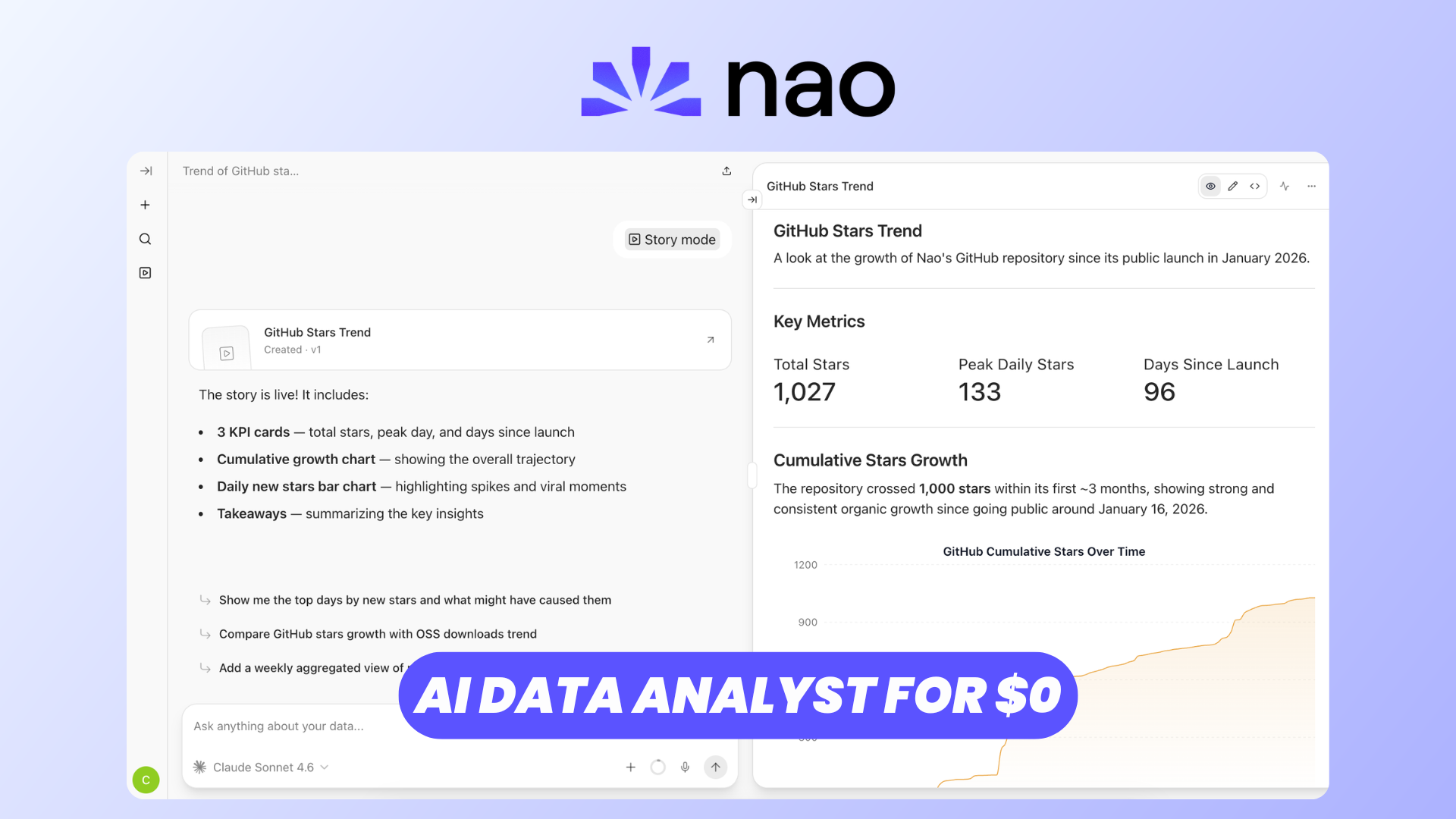
Business data is incredibly valuable, but actually extracting useful information from it often means writing SQL queries, navigating dashboards, or asking a data analyst to investigate something for you.
Nao takes a different approach: it gives your organization an AI data analyst that you can simply talk to.
Nao is a free and open-source analytics agent designed to connect large language models to your existing data stack. Users can ask questions in natural language, and the agent can inspect the available context, generate SQL, execute queries, visualize the results, and explain what it found.
And because Nao can be self-hosted, you retain control over the application and can bring your own LLM API keys rather than sending everything through a proprietary analytics SaaS platform.
Let's explore what it can do.
Introduction
At its core, Nao is a framework for building and deploying AI analytics agents.
There are essentially two sides to the platform.
For data teams, Nao provides a Context Builder where you can define the databases, schemas, repositories, documentation, business rules, metrics, tools, and other information the agent needs to understand your organization.
For everyone else, Nao provides a much simpler chat interface.
Instead of opening your BI tool and building a dashboard, you can ask something like:
"How much revenue did we generate last month compared with the previous month?"
Nao discovers the relevant context, generates the appropriate query, executes it against your connected data source, and returns an explanation alongside the underlying data and visualizations. You can also inspect the generated SQL and the sources the agent relied upon, which makes the process considerably more transparent than a simple AI chatbot.
The project is open source and can be run locally or deployed using Docker. You can find the complete setup and configuration options in the official Nao documentation.
LLM Providers
Because Nao is an AI analytics platform, we first need to give our agent a model.
Nao isn't locked into a single AI provider. It supports several major LLM platforms, including:
- Anthropic
- OpenAI
- Mistral
- Azure OpenAI
- AWS Bedrock
- OpenRouter
Administrators can configure providers from the Models section and choose exactly which model IDs should be available to users. API credentials can also be supplied through environment variables, which is particularly useful for self-hosted production deployments.
OpenRouter support also gives you access to many different models through a single provider.
This flexibility is useful because analytics workloads can vary considerably. You may want a powerful reasoning model for complicated queries while using a smaller, cheaper model for simpler requests.
And because you're providing the API credentials, you aren't tied to a fixed AI model bundled with the application.
Chat with Your Data
This is where Nao becomes really interesting.
Once your data sources and context are configured, users don't necessarily need to know SQL at all.
You can simply start a conversation and ask questions about the business in natural language.
Nao's agent first searches its context to understand your data model and business rules. It then generates SQL, executes the query against the appropriate data source, and interprets the returned results.
For example, you could ask:
"Show me our revenue for the last six months."
Nao can query the underlying database and return the results as a table or visualization.
You can then continue naturally:
"Break that down by country."
And then:
"Why did revenue decrease in May?"
Because Nao maintains conversation history, follow-up questions can build upon the previous analysis rather than forcing you to construct a completely new query every time.
Visualizations are integrated directly into the chat interface, with support for charts including bars, lines, areas, scatter plots, pie charts, and more.
Importantly, Nao doesn't completely hide what the AI is doing. You can inspect the generated SQL, reasoning, results, and context sources behind an answer.
That transparency is particularly important when AI is being used to make decisions based on company data.
CSV / XLS Exports
Sometimes getting an answer isn't enough—you also need the underlying data.
Nao lets you work with the query results as structured data rather than limiting everything to an AI-generated paragraph or chart.
This means the chat interface can serve as an extremely convenient starting point for ad-hoc analysis: ask for the dataset you need using natural language, inspect the generated results, and export them when you need to continue working with the data elsewhere.
For example, instead of manually writing a query to retrieve customers matching a particular set of conditions, you can ask Nao to find them and then use the resulting dataset in your usual spreadsheet or reporting workflow.
It's a simple feature, but it helps bridge the gap between conversational analytics and traditional data workflows.
Skills
Another interesting part of Nao is its extensibility.
The agent isn't limited to generating SQL. Nao has a broader tool and skill system that allows you to define additional capabilities for your analytics agent.
Nao also publishes reusable context-engineering skills compatible with agentic development environments such as Claude Code, Codex, and Cursor. These can help automate workflows including setting up context, defining business rules, creating evaluation tests, auditing context, and adding semantic layers.
This becomes particularly useful as your analytics agent grows.
The quality of an AI data analyst depends heavily on the context you provide. The agent needs to understand what your tables represent, how they relate to each other, and—perhaps most importantly—what your company's metrics actually mean.
Nao treats this context as something that can be explicitly engineered, versioned, tested, and improved rather than relying entirely on increasingly large prompts.
Story Mode
Chats are great for exploring data, but they're not always the best format for presenting your conclusions to somebody else.
That's where Stories come in.
Nao lets you transform analytics work into longer-form reports that can combine explanations, data, and visualizations.
Instead of sharing a long conversation containing every exploratory question you asked, you can build a cleaner story around the important findings.
Stories can also be shared with other users, making them useful for recurring business reporting, investigations, or simply communicating an interesting insight to your team.
And because stories remain connected to Nao's conversational experience, users can continue exploring the analysis instead of receiving a completely static report. Nao's chat interface supports asking questions about selections from chats and stories, while shared conversations can also be forked into independent analyses.
So Nao isn't just trying to replace SQL queries—it can cover part of the reporting workflow that normally happens after the analysis as well.
Feed Automations
Of course, some questions aren't things you want to ask manually every Monday morning.
Nao also supports automations, allowing the agent to perform recurring analytics tasks on a schedule.
That opens up workflows such as automatically generating a weekly sales analysis, monitoring an important metric, or producing recurring updates for your team.
Automations can integrate with channels including email and Slack, as well as GitHub-based workflows.
This changes the role of the AI agent considerably.
Instead of only being something you open when you have a question, it can proactively run recurring analysis and distribute the results where your team already works.
For example, your sales team could receive a recurring summary of weekly performance without somebody manually rebuilding the same report every week.
Users & Roles
If you're deploying Nao for an organization, you probably don't want everyone to have administrative access.
Nao includes a user-management system with three main roles.
Admins have full access and can manage things like users, integrations, models, prompts, budgets, chats, and stories.
Members are the regular users of the analytics agent. They can chat with Nao, create and share stories, and manage their own conversational memories.
Finally, Viewers have read-only access. They can consume shared chats and stories but can't start new analyses or modify the system.
This makes it possible to expose the same analytics environment to different parts of an organization without giving everyone access to its configuration.
Google OAuth can also be configured for authentication, including restricting registration to approved email domains.
Connecting your Data
Naturally, none of this is particularly useful until Nao understands your actual data.
Nao's Context Builder is responsible for creating that connection between your infrastructure and the AI agent.
When initializing a project, you can connect databases, repositories, LLMs, and other sources. Running nao sync then populates a file-system-style context repository containing the information the agent needs.
That context isn't limited to database schemas.
You can bring in repositories—for example, your dbt project—along with documentation, Notion content, custom rules, semantic definitions, tools, and MCP servers.
This is one of the most important architectural ideas behind Nao.
Giving an LLM access to a database is relatively easy.
Giving it enough business context to understand that database reliably is much harder.
Nao therefore encourages you to explicitly document your data architecture, important tables, business definitions, metrics, date conventions, and analysis rules.
Because the context exists as files, it can also be reviewed and version-controlled like code.
Nao MCP
MCP support works in both directions.
First, Nao can consume MCP servers to give its analytics agent additional tools. Administrators can enable or disable individual MCP servers and even restrict which tools from those servers are exposed to users.
But Nao can also expose itself as an MCP server. The documentation includes a dedicated MCP endpoint specifically so external AI clients can query your data through Nao.
That creates some interesting possibilities.
Instead of only chatting with your analytics agent through Nao's own interface, you can make that analytics capability available to other MCP-compatible AI tools and agents.
Your carefully configured Nao context can therefore become a reusable analytics layer across a broader AI ecosystem.
Usage & Costs
AI analytics can become expensive surprisingly quickly, particularly when many users have access to powerful models.
Nao includes an administrative Usage & Costs dashboard to help you understand exactly what is happening.
Administrators can monitor the number of messages users send, total token consumption, token costs, model usage, and usage across channels such as the web interface and messaging integrations.
Metrics can be inspected at daily, weekly, or monthly granularity and filtered by model.
This is useful both for controlling expenses and for understanding how people are actually using your analytics agent.
Nao's approach to context engineering also explicitly considers cost. Better context can reduce unnecessary exploratory queries and prevent the model from consuming large amounts of irrelevant information.
So the objective isn't simply to give the agent as much context as possible. It's to give it the right context.
White-label
For companies that want to deploy the analytics experience internally—or potentially expose it as part of their own product—Nao also offers white-label capabilities.
The Enterprise edition supports replacing Nao's default branding with your own application name, logos, and favicon.
This allows the underlying Nao analytics experience to feel like part of your own internal platform rather than a separate third-party application.
It's worth noting that this is part of Nao Enterprise, rather than the standard open-source feature set. The Enterprise offering also adds capabilities intended for larger organizational deployments, such as enterprise authentication and more advanced permissions.
Conclusion
Nao is an interesting example of how AI can change the way we interact with business data.
Instead of requiring every question to become a dashboard request or SQL query, Nao puts a conversational agent between users and the existing data stack.
But what makes the project particularly interesting isn't simply the chat interface.
You get an open context system for teaching the agent about your business, support for multiple LLM providers, visualizations, stories, scheduled automations, user roles, MCP integration, cost monitoring, and the ability to self-host the platform.
And because the project is open source, you can inspect it, customize it, and deploy it on infrastructure you control.
If you want to try it yourself, you can deploy Nao with Elestio, while the official Nao documentation covers the project configuration, data connections, context engineering, integrations, and self-hosting options in more detail.