
Self-Hosted GitLab + Elestio: Set Up CI/CD from Your Own Git

If your code lives on a self-hosted GitLab instance, deploying it to a managed platform usually means writing your own pipeline scripts, juggling SSH keys, or running a custom runner somewhere. Plenty of you have told us you don't want to mirror private repos to GitHub or GitLab.com just to get auto-deploy on Elestio. As of today, that workaround is dead.
Elestio's CI/CD now supports self-hosted GitLab as a first-class Git source. Connect your private GitLab instance once with a Personal Access Token, and every push triggers a deploy on Elestio. Same flow you already get with GitHub or GitLab.com repos, just pointed at your own server.
Why this matters
If you run GitLab on your own infrastructure, you usually have a reason: compliance, data residency, network isolation, or simply the cost of a paid GitLab.com plan at scale. None of those reasons should force you off a managed deployment platform.
Until now, the workaround options were painful: mirror your private repos to a public Git host (defeating the point), or build your own deployment scripts on a self-managed runner. The new integration handles the boring parts for you: webhook setup, SSH key provisioning, repository scoping at the group or subgroup level, and branch tracking with auto-deploy triggers.
How it works
Elestio's CI/CD treats your self-hosted GitLab like any other Git provider. You give us two things:
- Your GitLab instance URL (e.g.
https://gitlab.yourcompany.internal, no trailing slash) - A Personal Access Token with the
apiscope
We use that PAT to list the repositories you have access to (respecting your GitLab permissions), register a webhook on each project you connect, and pull the latest code on each push. The PAT is encrypted at rest. Webhooks send a signed payload, and we verify the signature before kicking off a deploy.
The api scope is the only scope we need, and the only scope that works. Narrower scopes like read_api or read_repository cannot create webhooks or manage deploy keys, so connecting with them will fail. Requires GitLab 13.5 or newer (October 2020), which covers basically every active instance.
Step-by-step setup
Prerequisites
- A self-hosted GitLab instance reachable from Elestio
- A Personal Access Token from your GitLab account
- An Elestio service to deploy to, or a new one you're about to create
Step 1: Create the PAT on your GitLab instance
In your GitLab UI, go to your avatar menu (top right) → Preferences → Access Tokens → Add new token. Or jump straight to /-/profile/personal_access_tokens.
- Token name:
elestio-cicd(or whatever you'll recognize later) - Expiration: pick a date that fits your security policy
- Scopes: tick
api, and onlyapi
Hit "Create personal access token" and copy the value immediately. GitLab will not show it again. The token starts with glpat-.
Step 2: Pick GitLab in Elestio
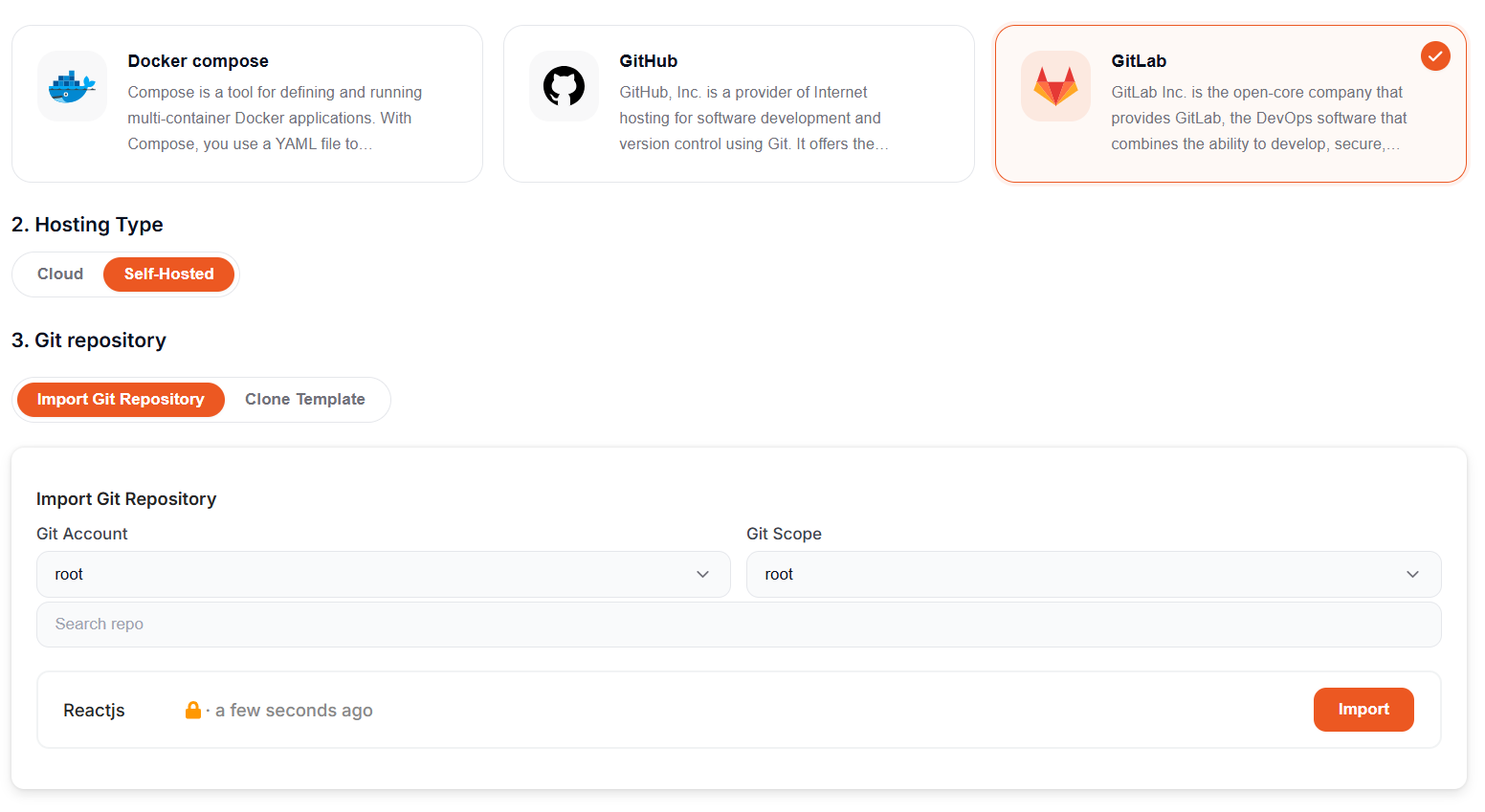
When creating a new service, or editing an existing one's CI/CD source, pick GitLab as the Git provider. Then flip the Hosting Type toggle from Cloud to Self-Hosted.
Heads up: switching between Cloud and Self-Hosted resets any repositories and settings you'd already picked, so do this toggle first.
Step 3: Connect your instance
Click to add a new Git account. A modal appears asking for two fields:
- GitLab Instance URL: full URL with
https://and no trailing slash (e.g.https://gitlab.yourcompany.internal) - Personal Access Token: paste the token you just generated
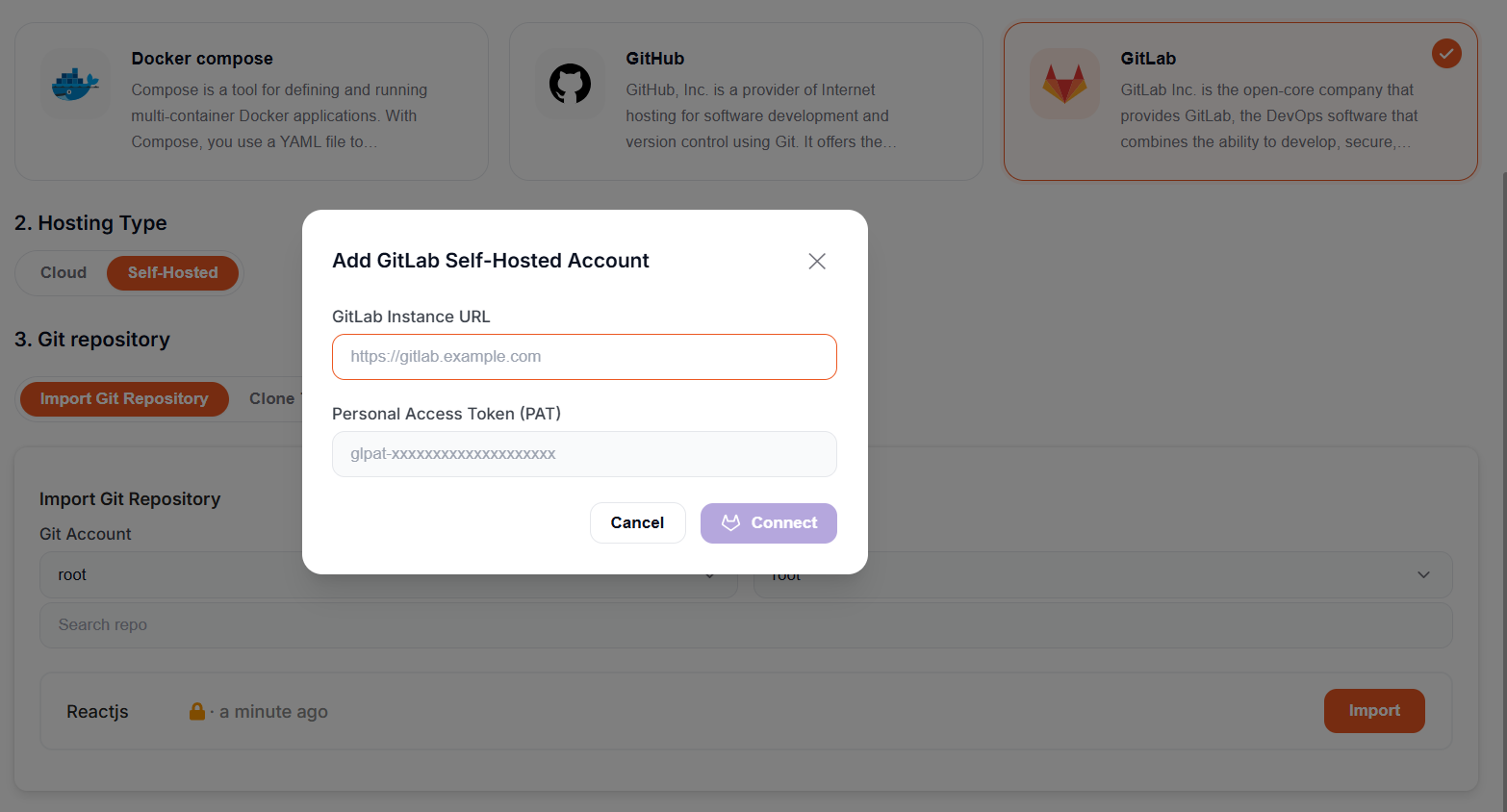
Hit Connect. On success you'll see Connected as [username] on [instance URL], and the repository list loads below.
Step 4: Import the repo
Use the Git Scope dropdown to filter by group, subgroup, or user. Search for the repo you want to deploy. Click Import.
That's it. Elestio registers the webhook on your GitLab project, pulls the code, and starts the first deploy. From now on, every push to the tracked branch ships a new version to your service.
You can connect more than one self-hosted instance, by the way. Open the Git Account dropdown and pick "Add Git Account" to wire up another one with its own PAT.
For the full reference, see the Elestio docs on deploying a CI/CD pipeline via GitLab self-hosted.
Common gotchas
A few things that trip people up:
The GitLab instance must be reachable from Elestio. If your GitLab sits behind a firewall or VPN, you'll need to allow inbound HTTPS from Elestio's IP range.
Use a token from a service account, not your personal login. When the user who created the PAT leaves the company or rotates their token, every connected repo breaks. A service account avoids that whole class of problem.
The URL format is strict. Include the protocol, drop the trailing slash. https://gitlab.acme.com works; gitlab.acme.com/ or https://gitlab.acme.com/ does not.
If you use the "Clone Template" flow instead of "Import Git Repository," your GitLab admin needs to enable Admin Area → Settings → General → Import and export settings → Allow imports from external URLs. Without it, template-based project creation fails with 404 or insufficient_scope even when the token is fine.
Subgroups appear flat in the dropdown. GitLab nests groups infinitely, but the Elestio UI shows them as a flat list with the full path. If you have mycompany/backend/api, you'll see it as mycompany/backend/api in Git Scope, not nested.
Troubleshooting
| Error | Likely cause | Fix |
|---|---|---|
AUTH_FAILED at connection |
Invalid token, expired token, or wrong instance URL | Verify the URL responds to curl -I from a public host and includes https:// with no trailing slash. Regenerate the PAT if needed |
INSUFFICIENT_SCOPES at connection |
PAT missing the api scope |
Edit the token (or create a new one) and tick api. Narrower scopes will not work |
insufficient_scope during template import |
External URL imports disabled at the instance level | Ask your GitLab admin to enable Allow imports from external URLs under Admin Area → Settings → General |
| Push doesn't trigger deploy | Webhook missing or signature mismatch | Re-import the repo, or check GitLab's webhook delivery logs under Project → Settings → Webhooks |
| Branch not found | Empty repo, or the tracked branch name does not exist | Push at least one commit on the branch you configured in the pipeline |
What's next
Self-hosted GitLab is the second self-hosted Git source we support, after a long stretch of GitHub-only and GitLab.com-only. Gitea, Forgejo, and Bitbucket self-hosted are on the roadmap. If one of those is blocking you, reply to this post and tell us which.
Until then: connect your GitLab instance on Elestio, push some code, and stop maintaining your own deployment glue.
Thanks for reading ❤️
See you in the next one 👋